
Before you start
Have reliable product information and a specific reader question. Check whether AI assistance is available and configured for the selected task.
A recognisable example
DYMR writes a guide to layering an overshirt. It explains fit and combinations using confirmed products rather than inventing fabric claims or promising search rankings.
Step by step
- Open Content Studio and choose Articles or Pages. Start from a clear customer question and choose the intended source or destination.
- Add confirmed product facts and useful links. Where Brain is available, ask for a focused preparation task and inspect what it used.
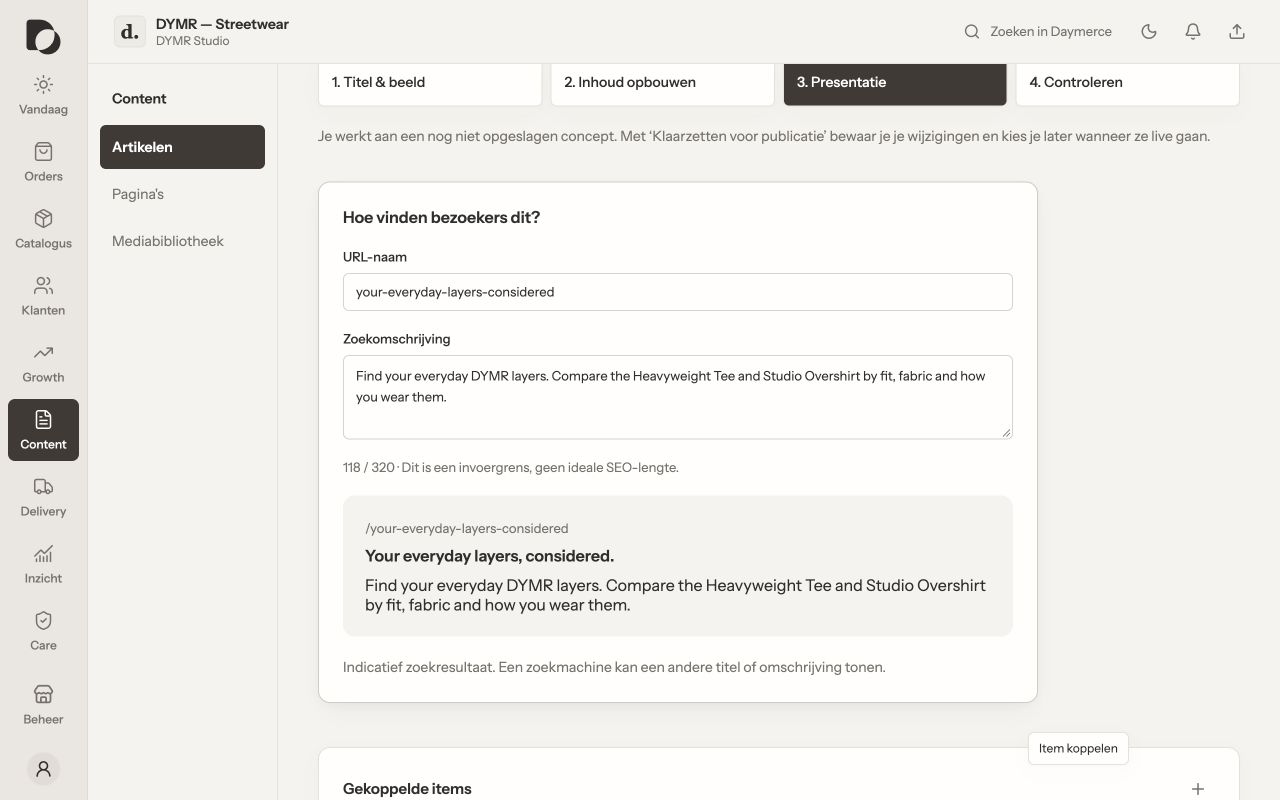
- Review the resulting text, product references, images, headings and metadata. Correct unsupported claims, awkward language and irrelevant repetition.
- Save the work and follow publication. Open the real published page and check the links and mobile reading experience.
What you should see
You have useful content with a clear product connection. AI preparation is not fact verification, and a saved document is not proof of publication or indexing.
If it does not work
AI is unavailable? Continue with the editor and your confirmed information. If the output is poor, narrow the task and improve the source facts rather than accepting a confident but unsupported answer.
Menu names and available actions depend on your app language, permissions and connected shop. Screens show the real Daymerce interface with fictional DYMR data; original screen labels are preserved.