
Before you start
Use the correct shop and a current packing queue. Keep the items and any required gift materials within reach.
A recognisable example
DYMR packs four tees for Noor. The packing view keeps the selected items and any gift instructions beside the work.
Step by step
- Open Orders, then Packing, and choose Begin packing. Review your round. Choose to collect items first if that helps your workspace.
- Open an order in the round. Compare each item and quantity with the actual products and mark the required checks only after checking them.
- Read gift instructions and complete any required gift checks. Use the exception or later option if something prevents correct packing.
- Confirm Packed when the order is ready. Continue through the round, then open the handover step and check what your shop has confirmed.
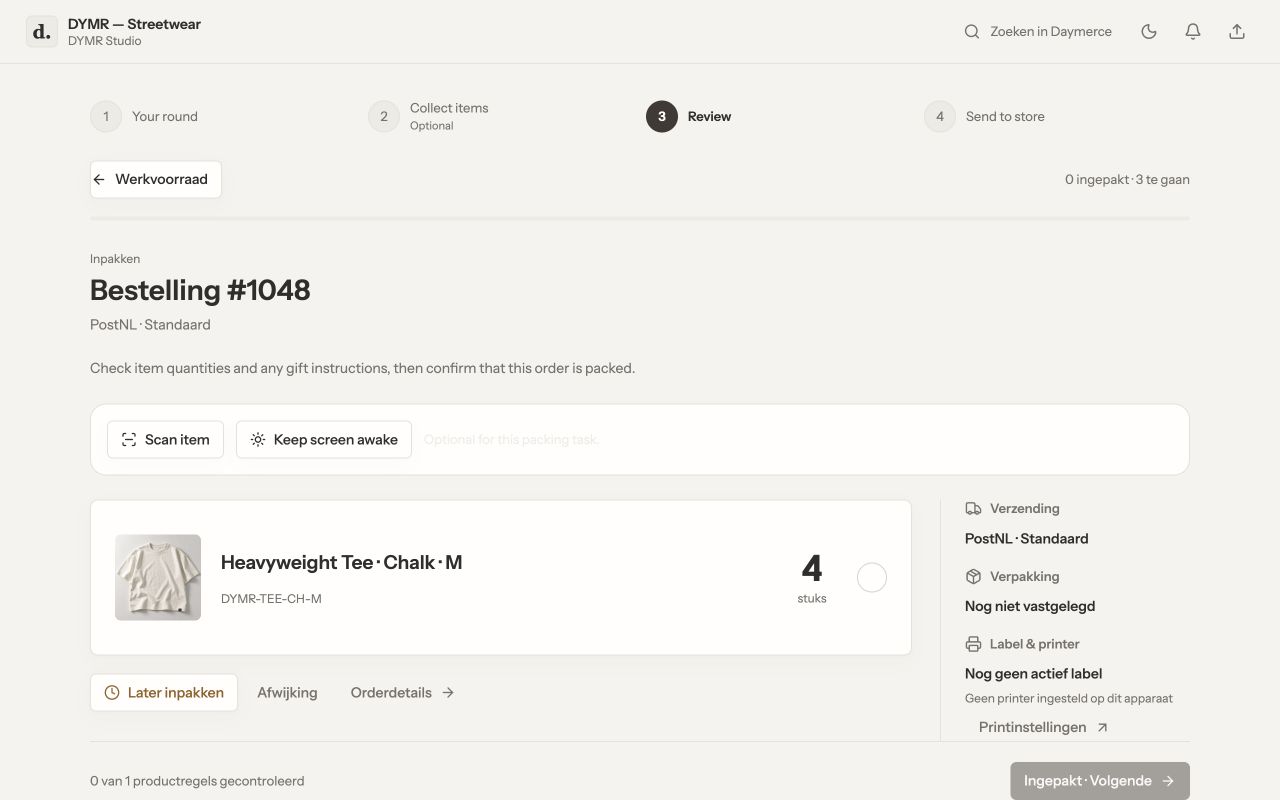
What you should see
The order is recorded as packed in the Daymerce round. Handover to WooCommerce and any labels or carrier steps have their own confirmation; packing alone does not prove dispatch.
If it does not work
Is a required check still open? Review the item quantities and gift instructions. If another colleague holds the round, coordinate before taking it over. If the queue is stale, refresh its confirmed state before continuing.
Menu names and available actions depend on your app language, permissions and connected shop. Screens show the real Daymerce interface with fictional DYMR data; original screen labels are preserved.